Script Integration
หลังจาก publish cookie configuration แล้ว Consentrix จะ generate Cookie Script ให้ในหน้า cookie detail ให้คัดลอก <script> tag ที่ระบบสร้างให้นั้นไปฝังในเว็บไซต์ เพื่อเปิดใช้งาน banner และ privacy preference panel
หน้านี้ออกแบบมาสำหรับนักพัฒนาและผู้ดูแลระบบเชิงเทคนิคที่ต้องฝัง Consentrix cookie widget, รับ browser event ฝั่ง client และตั้งค่า Content Security Policy ให้ถูกต้อง
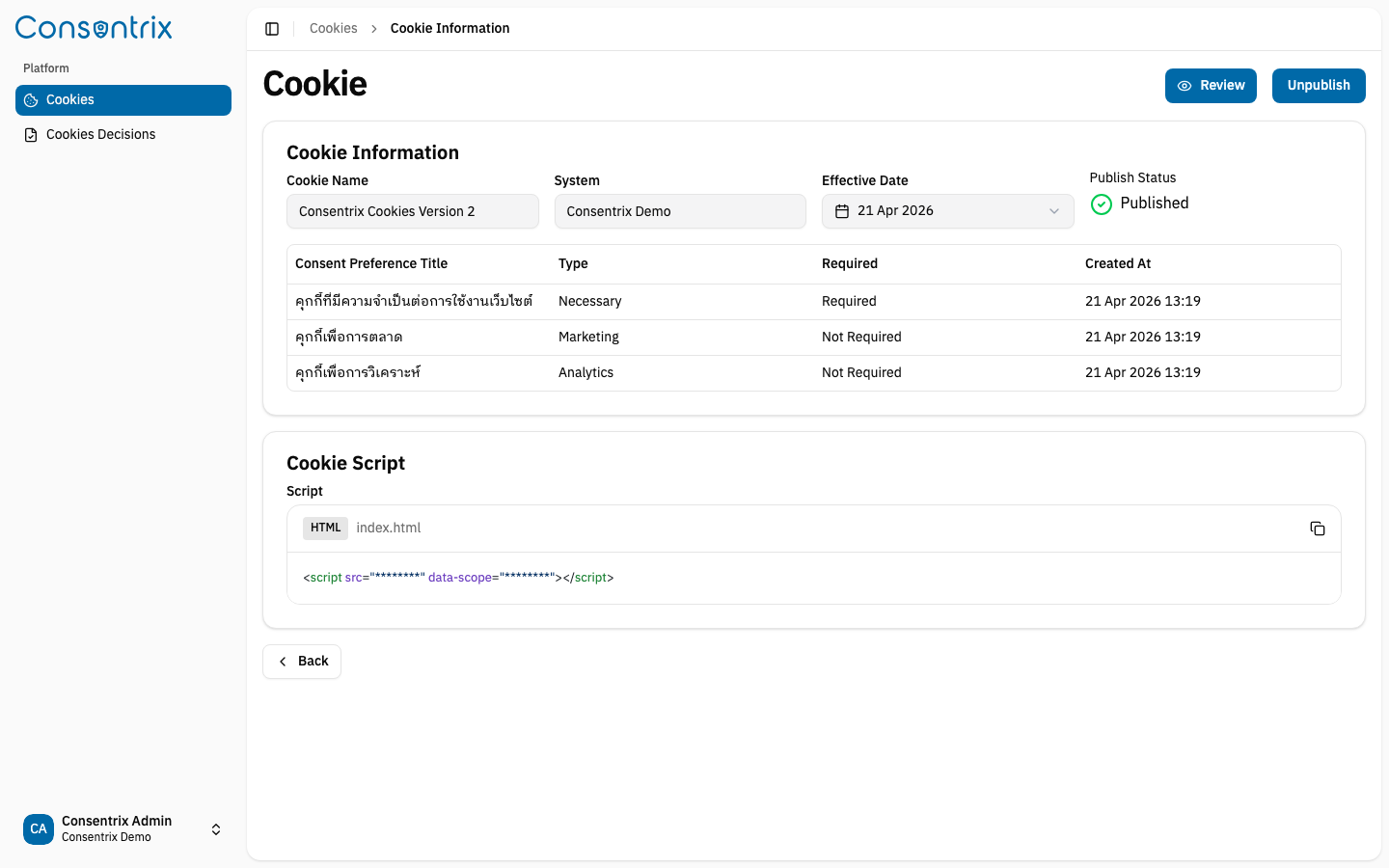
ดึงสคริปต์
- ไปที่ Platform → Cookies
- คลิก View ที่ cookie ที่ publish แล้ว
- เลื่อนลงมาที่ส่วน Cookie Script
- คัดลอก
<script>tag ที่ระบบแสดงให้ ตรงตามที่เห็น
ฝังสคริปต์
นำ script tag ที่คัดลอกมาไปวางใน HTML ของเว็บไซต์ โดยวางได้สองตำแหน่ง:
- ภายใน
<head>ถ้าต้องการให้โหลดเร็วตั้งแต่ต้นหน้า หรือ - ก่อนปิด
</body>ก็ได้
<!doctype html>
<html>
<head>
  <!-- Other head elements -->

  <!-- Cookie consent script -->
  <script
    src="https://cdn-consentrix.odds.team/cookie-script.js"
    data-scope="YOUR_SCOPE_ID"
  ></script>

</head>
<body>
  <!-- Page content -->
</body>
</html>
อย่า hard-code ชื่อ artifact ของ UAT หรือ environment เฉพาะลงใน application โดยตรง เพราะในหน้า detail ระบบจะแสดง script URL ที่ถูกต้องตาม deployment target ปัจจุบันอยู่แล้ว
data-scope attribute
data-scope ใช้เชื่อม script เข้ากับ System ID ของ cookie ที่ publish อยู่ widget จะอ่านค่านี้จาก script tag, fetch รายละเอียด cookie consent ที่ตรงกัน และส่ง scope เดียวกันเมื่อบันทึก decision ของผู้เข้าชม แต่ละ published cookie จะมีค่าที่ generate เฉพาะของตัวเอง ดังนั้น อย่าแก้ค่านี้ด้วยมือ
Styling และ theming จาก host page
widget เวอร์ชันปัจจุบัน mount เข้า #cookie-consent-root และ render UI อยู่ภายใน Shadow DOM ดังนั้นพฤติกรรมด้าน styling จะเปลี่ยนไปดังนี้:
- selector ทั่วไปจากเว็บไซต์ของคุณ เช่น
button,p, หรือdivจะไม่ไหลเข้าไปเปลี่ยนหน้าตาของ widget อีกต่อไป - widget ยังรับค่า theme variables จาก
#cookie-consent-rootได้ - dark mode จะ sync อัตโนมัติเมื่อ parent page ใช้
.dark,data-theme="dark"หรือdata-color-mode="dark"บน<html>หรือ<body>
Theme overrides
ใช้ CSS variables บน #cookie-consent-root เมื่อต้องการปรับ theme ของ widget จาก host page โดยเฉพาะสี primary, รูปแบบเส้นขอบ หรือเงาของ banner
#cookie-consent-root {
  --radius: 1rem;
  --background: #ffffff;
  --foreground: #0f172a;
  --primary: #0f766e;
  --primary-foreground: #ffffff;
  --border: #d1d5db;
  --shadow-banner: 0 10px 30px rgba(15, 23, 42, 0.18);

}

.dark #cookie-consent-root,
[data-theme="dark"] #cookie-consent-root,
[data-color-mode="dark"] #cookie-consent-root {
  --background: #0f172a;
  --foreground: #f8fafc;
  --primary: #34d399;
  --primary-foreground: #052e2b;
  --border: rgba(255, 255, 255, 0.12);
}
ถ้าต้องการเปลี่ยน background เฉพาะตอน dark theme ให้ override ค่า --background และตัวแปรที่เกี่ยวข้องภายใต้ selector ของ dark theme ฝั่ง host page ตามตัวอย่างด้านบน
แนวทางนี้ยังทำงานร่วมกับการ toggle theme ของ host page ได้ เพราะ widget จะคอยฟังสัญญาณ dark mode จาก parent page ต่อเนื่อง
พฤติกรรมด้านภาษา
widget รองรับ th และ en
ลำดับการตรวจจับภาษาอัตโนมัติ
ระบบจะ resolve locale ตามลำดับนี้:
- ค่า
<html lang>ของ host page เช่นlang="th"หรือlang="en-US" - path prefix ของ URL เช่น
/th/...หรือ/en/... - subdomain ตัวแรก เช่น
th.example.comหรือen.example.com - ภาษาของ browser เช่น
th-THหรือen-US
ถ้าไม่พบ locale ที่รองรับ ระบบจะ fallback เป็น th
การสลับภาษาแบบ live
ถ้าเว็บไซต์ของคุณเป็น SPA หรือสลับภาษาในหน้าเดียว ให้ dispatch browser event หลังจาก app เปลี่ยนภาษา:
window.dispatchEvent(
  new CustomEvent('cookie-consent:locale', {
      detail: 'en',
  })
);
ค่า detail ใช้ได้ทั้ง short code เช่น th หรือ en และ locale string เช่น th-TH หรือ en-US โดยค่าที่ไม่รองรับจะถูก ignore
รองรับรูปแบบ object detail ด้วย:
window.dispatchEvent(
  new CustomEvent('cookie-consent:locale', {
      detail: { locale: 'en-US' },
  })
);
รับ event การทำงานของ cookie consent
Consentrix cookie widget จะ dispatch browser CustomEvent บน window หลังจากบันทึก consent action สำเร็จแล้ว คุณสามารถ listen event เหล่านี้จากเว็บไซต์ของคุณเพื่อนำไปทำงานต่อ เช่น อัปเดต analytics tag เปิดใช้งาน third-party scripts หรือ sync state ฝั่ง client
ชื่อ event
Canonical Event
| Event | คำอธิบาย |
|---|---|
consentrix_cookie_consent | Canonical event สำหรับการตัดสินใจ consent ทั้งหมด - ตรวจสอบ field action |
Action-Specific Lightweight Events
| Event | คำอธิบาย |
|---|---|
consentrix_cookie_accept_all | เรียกเมื่อผู้ใช้นกด "ยอมรับทั้งหมด" |
consentrix_cookie_reject_all | เรียกเมื่อผู้ใช้นกด "ปฏิเสธทั้งหมด" |
consentrix_cookie_save_preferences | เรียกเมื่อผู้ใช้บันทึกการตั้งค่า |
consentrix_cookie_open_preferences | เรียกเมื่อเปิดหน้าต่างการตั้งค่า |
Category-Enabled Events (สำหรับ lazy-load scripts)
Event เหล่านี้จะเรียก เพียงครั้งเดียวต่อหน้า สำหรับแต่ละ category ที่เปิดใช้งาน:
| Event | เรียกเมื่อ |
|---|---|
consentrix_cookie_category_necessary_enabled | Category Necessary เปิดใช้งาน (เสมอ) |
consentrix_cookie_category_analytics_enabled | ได้รับ consent สำหรับ Analytics |
consentrix_cookie_category_marketing_enabled | ได้รับ consent สำหรับ Marketing |
Single unified listener
Event consentrix_cookie_consent จะถูกเรียกทุกครั้งที่มีการตัดสินใจ consent ใช้ field action ใน event detail เพื่อแยกแยะผลลัพธ์:
// listener เดียวครอบคลุมการตัดสินใจทั้งหมด
window.addEventListener('consentrix_cookie_consent', (event) => {
  const { detail } = event as CustomEvent<ConsentEventDetail>;

  console.log('Action:', detail.action); // 'accept_all', 'reject_all', 'save_preferences', หรือ 'update'
  console.log('Source:', detail.source); // 'banner' หรือ 'preferences_modal'
  console.log('Categories:', detail.categories); // { necessary: true, analytics: true }
  console.log('Timestamp:', detail.timestamp); // ISO 8601 string

  // เปิด/ปิด scripts ตาม normalized category record
  if (detail.categories.analytics) {
      loadAnalytics();
  }
  if (detail.categories.marketing) {
      loadMarketing();
  }
});
การเชื่อมต่อกับ Google Analytics 4
ส่งข้อมูล consent decision ไป GA4 พร้อม field action:
window.addEventListener('consentrix_cookie_consent', (event) => {
  const { detail } = event as CustomEvent<ConsentEventDetail>;

  gtag('event', 'cookie_consent', {
      event_category: 'cookie',
      event_label: detail.action,
      consent_id: detail.consentId,
      categories: Object.keys(detail.categories).filter((key) => detail.categories[key]).join(','),
      source: detail.source
  });
});
การเชื่อมต่อกับ Google Tag Manager
ส่งข้อมูล consent decision ไป data layer:
window.addEventListener('consentrix_cookie_consent', (event) => {
  const { detail } = event as CustomEvent<ConsentEventDetail>;

  dataLayer.push({
      event: 'cookieConsent',
      consentAction: detail.action,
      consentId: detail.consentId,
      categories: detail.categories,
      timestamp: detail.timestamp,
      source: detail.source
  });
});
โครงสร้างของ event detail
โครงสร้างของ event detail:
type ConsentAction = 'accept_all' | 'reject_all' | 'save_preferences' | 'update';

type ConsentEventDetail = {
  version: 'v1'; // Canonical event schema version
  timestamp: string; // ISO 8601 string
  source: 'banner' | 'preferences_modal' | 'page_load' | string;
  action: ConsentAction; // ประเภทของ consent action
  consentId: string; // ID ของ cookie consent configuration
  systemId: string | null; // System ID ที่เชื่อมโยงกับ consent นี้
  categories: Record<string, boolean>; // Category consent state
  categoryDetails?: CookieCategoryDetail[];
  metadata?: Record<string, unknown>;
};

type CookieCategoryDetail = {
  id: string; // Backend category ID
  type: string; // type ของ category เช่น necessary, analytics, marketing
  title: string; // title ของ category
  required: boolean; // category นี้บังคับไหม
};
รายละเอียดของ Category-Enabled Event
Category events (consentrix_cookie_category_*_enabled) ประกอบด้วย:
type CategoryEnabledEventDetail = {
  timestamp: string;                           // ISO 8601 formatted (เช่น "2024-01-15T10:30:00.000Z")
  source: string;                              // 'banner', 'preferences_modal', 'page_load', ฯลฯ
  consentId: string;                           // Consent configuration ID
  systemId: string | null;                     // System ID
  category: string;                            // Category type (เช่น "analytics", "marketing")
  categoryId: string;                          // Backend category ID
};
ตัวอย่าง event listener แบบสมบูรณ์
// 1. Canonical event - เรียกสำหรับการตัดสินใจ consent ทุกครั้ง
window.addEventListener('consentrix_cookie_consent', (e) => {
  const { action, categories, timestamp } = e.detail;
  console.log('Consent decision:', action, categories);
});

// 2. Action-specific lightweight events
window.addEventListener('consentrix_cookie_accept_all', (e) => console.log('Accept all'));
window.addEventListener('consentrix_cookie_reject_all', (e) => console.log('Reject all'));
window.addEventListener('consentrix_cookie_save_preferences', (e) => console.log('Save preferences'));
window.addEventListener('consentrix_cookie_open_preferences', (e) => console.log('Open preferences'));

// 3. Category-enabled events (สำหรับ lazy-load scripts)
window.addEventListener('consentrix_cookie_category_necessary_enabled', (e) => {
  const { timestamp, category, categoryId } = e.detail;
  console.log('Necessary enabled at', timestamp, '-', { category, categoryId });
});
window.addEventListener('consentrix_cookie_category_analytics_enabled', (e) => {
  const { timestamp, category, categoryId } = e.detail;
  console.log('Analytics enabled at', timestamp, '-', { category, categoryId });
  // loadAnalyticsScripts();
});
window.addEventListener('consentrix_cookie_category_marketing_enabled', (e) => {
  const { timestamp, category, categoryId } = e.detail;
  console.log('Marketing enabled at', timestamp, '-', { category, categoryId });
  // loadMarketingScripts();
});

// 4. Helper สำหรับ register known category events
const listenForCategoryEnabled = (category, handler) => {
  window.addEventListener(
      `consentrix*cookie_category*${category}_enabled`,
      handler
  );
};

listenForCategoryEnabled('analytics', (e) => {
  const { timestamp, category, categoryId } = e.detail;
  console.log(`Category ${category} enabled at`, timestamp, { categoryId });
});
Content Security Policy (CSP)
ถ้าเว็บไซต์ของคุณใช้ Content Security Policy header ให้ allow domain ของ Consentrix script ใน script-src และ Consentrix API host ใน connect-src widget ยังโหลด default IBM Plex Sans Thai fonts จาก Google Fonts ด้วย ให้เพิ่ม font domains หากเว็บไซต์ของคุณ block external styles หรือ fonts
Recommended CSP configuration
script-src 'self' https://cdn-consentrix.odds.team;
connect-src 'self' https://<consentrix-api-host>;
style-src 'self' https://fonts.googleapis.com;
font-src 'self' https://fonts.gstatic.com;
Common issues
| Problem | Cause | Solution |
|---|---|---|
| Script does not load | CSP | เพิ่ม |
| Banner does not appear | script URL หรือค่า | คัดลอก script ใหม่จากหน้า published cookie detail แล้วแทน snippet เดิมทั้งหมด |
| Banner does not appear after the script loads | CSP | เพิ่ม Consentrix API host ของ deployment นี้ใน |
| Widget font does not load | CSP | allow |
| รูปแบบของ widget ไม่ตรงกับ host page | Shadow DOM แยก widget ออกจาก selector ทั่วไปของหน้าเว็บ | กำหนด CSS variables ที่ |
| ภาษา widget ไม่เปลี่ยนตาม SPA | locale ของหน้าเปลี่ยน แต่หน้าไม่ได้ reload ใหม่ | dispatch event |
| Console shows CSP violation | browser บล็อก resource ตาม CSP | เปิด Browser Console → Console แล้วตรวจข้อความ CSP violation |
How to debug
- เปิดเว็บไซต์ของคุณใน browser
- เปิด Developer Tools ด้วย F12 หรือ Cmd+Option+I
- ดูที่แท็บ Console ว่ามี CSP หรือ network errors หรือไม่
- ดูที่แท็บ Network เพื่อยืนยันว่า script โหลดสำเร็จและได้ HTTP 200
- ตรวจสอบว่า
<script>tag ที่ render แล้ว ยังมีค่าdata-scopeที่คาดไว้ครบถ้วน
ลิงก์ที่เกี่ยวข้อง
- Managing Cookies - สร้าง review publish และ unpublish cookie configurations
- Cookie Consent Overview - ทำความเข้าใจ cookie workflow ก่อน embed
- Cookie Concepts - ทำความเข้าใจ concepts ที่ใช้ใน embed flow
unsafe-inlineการใช้ unsafe-inline ใน script-src ของ CSP จะลดระดับความปลอดภัย ควรระบุ domain ของ Consentrix script แบบเจาะจงแทน