Script Integration
After publishing a cookie configuration, Consentrix generates a Cookie Script in the cookie detail page. Copy that generated <script> tag and embed it in your website to activate the banner and privacy preference panel.
This page is intended for developers and technical implementers who need to embed the Consentrix cookie widget, handle browser-side events, and work with Content Security Policy requirements.
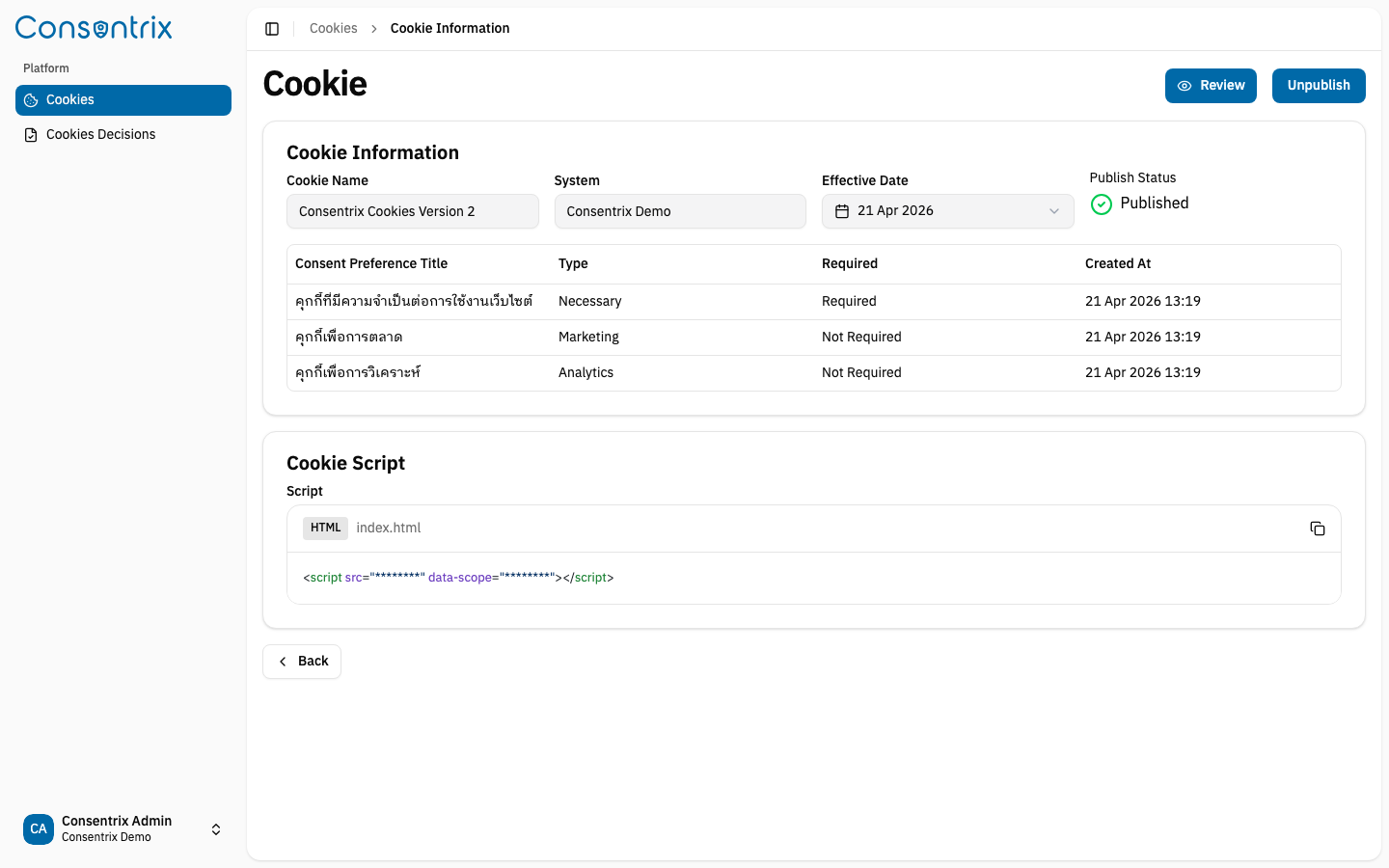
Get the script
- Navigate to Platform → Cookies.
- Click View on a published cookie.
- Scroll to the Cookie Script section.
- Copy the generated
<script>tag exactly as shown.
Embed the script
Add the generated script tag to your website's HTML. Place it either:
- Inside the
<head>tag for early loading, or - Just before the closing
</body>tag
<!doctype html>
<html>
<head>
  <!-- Other head elements -->

  <!-- Cookie consent script -->
  <script
    src="https://cdn-consentrix.odds.team/cookie-script.js"
    data-scope="YOUR_SCOPE_ID"
  ></script>

</head>
<body>
  <!-- Page content -->
</body>
</html>
Do not hard-code a UAT or environment-specific artifact name in your application. The detail page already shows the correct script URL for the current deployment target.
data-scope attribute
The data-scope attribute links the script to the published cookie's System ID. The widget reads this value from the script tag, fetches the matching cookie consent details, and includes the same scope when saving visitor decisions. Each published cookie has its own generated value — do not modify this value manually.
Host page styling and theming
The current widget version mounts into #cookie-consent-root and renders the UI inside a Shadow DOM. This changes how host-page styling works:
- General element selectors from your website such as
button,p, ordivno longer bleed into the cookie widget. - The widget still inherits theme variables from
#cookie-consent-root. - Dark mode is synchronized automatically when the parent page uses
.dark,data-theme="dark", ordata-color-mode="dark"on<html>or<body>.
Theme overrides
Use CSS variables on #cookie-consent-root when you want to customize the widget theme, especially the primary color, border styling, or banner shadow from the host page.
#cookie-consent-root {
  --radius: 1rem;
  --background: #ffffff;
  --foreground: #0f172a;
  --primary: #0f766e;
  --primary-foreground: #ffffff;
  --border: #d1d5db;
  --shadow-banner: 0 10px 30px rgba(15, 23, 42, 0.18);

}

.dark #cookie-consent-root,
[data-theme="dark"] #cookie-consent-root,
[data-color-mode="dark"] #cookie-consent-root {
  --background: #0f172a;
  --foreground: #f8fafc;
  --primary: #34d399;
  --primary-foreground: #052e2b;
  --border: rgba(255, 255, 255, 0.12);
}
If you want a different background in dark mode, override --background and related variables under your host page dark-theme selector as shown above.
This is also compatible with host-page theme toggling because the widget keeps listening to dark mode signals from the parent page.
Locale behavior
The widget currently supports th and en.
Auto-detection priority
Locale is resolved in this order:
- The host page
<html lang>value, such aslang="th"orlang="en-US" - URL path prefix such as
/th/...or/en/... - First subdomain such as
th.example.comoren.example.com - Browser language such as
th-THoren-US
If no supported locale is detected, the widget falls back to th.
Live locale switching
If your site is a SPA or allows in-page language switching, dispatch a browser event after your app changes locale:
window.dispatchEvent(
  new CustomEvent('cookie-consent:locale', {
      detail: 'en',
  })
);
The detail value may be a short code such as th or en, or a locale string such as th-TH or en-US. Unsupported values are ignored.
Object detail is also supported:
window.dispatchEvent(
  new CustomEvent('cookie-consent:locale', {
      detail: { locale: 'en-US' },
  })
);
Listen for cookie consent actions
The Consentrix cookie widget dispatches CookieScript-compatible browser CustomEvents on window after a consent action is successfully saved. Use these events from your website to update analytics tags, enable third-party scripts, or synchronize client-side state.
Event name
Canonical Event
| Event | Description |
|---|---|
consentrix_cookie_consent | Canonical event for all consent decisions |
Action-Specific Lightweight Events
| Event | Description |
|---|---|
consentrix_cookie_accept_all | Fires when user clicks "Accept All" |
consentrix_cookie_reject_all | Fires when user clicks "Reject All" |
consentrix_cookie_save_preferences | Fires when user saves custom preferences |
consentrix_cookie_open_preferences | Fires when preferences modal opens |
Category-Enabled Events (for lazy-loading scripts)
These events fire only once per page load for each enabled category:
| Event | Fires When |
|---|---|
consentrix_cookie_category_necessary_enabled | Necessary category is enabled (always true) |
consentrix_cookie_category_analytics_enabled | Analytics consent is given |
consentrix_cookie_category_marketing_enabled | Marketing consent is given |
Single unified listener
The consentrix_cookie_consent event fires for all consent decisions. Use the action field in the event detail to distinguish between different outcomes:
// Single listener covers all decisions
window.addEventListener('consentrix_cookie_consent', (event) => {
  const { detail } = event as CustomEvent<ConsentEventDetail>;

  console.log('Action:', detail.action); // 'accept_all', 'reject_all', 'save_preferences', or 'update'
  console.log('Source:', detail.source); // 'banner' or 'preferences_modal'
  console.log('Categories:', detail.categories); // { necessary: true, analytics: true }
  console.log('Timestamp:', detail.timestamp); // ISO 8601 string

  // Enable/disable scripts based on the normalized category record
  if (detail.categories.analytics) {
      loadAnalytics();
  }
  if (detail.categories.marketing) {
      loadMarketing();
  }
});
Google Analytics 4 integration
Send consent decisions to GA4 with the action field:
window.addEventListener('consentrix_cookie_consent', (event) => {
  const { detail } = event as CustomEvent<ConsentEventDetail>;

  gtag('event', 'cookie_consent', {
      event_category: 'cookie',
      event_label: detail.action,
      consent_id: detail.consentId,
      categories: Object.keys(detail.categories).filter((key) => detail.categories[key]).join(','),
      source: detail.source
  });
});
Google Tag Manager integration
Push consent decisions to the data layer:
window.addEventListener('consentrix_cookie_consent', (event) => {
  const { detail } = event as CustomEvent<ConsentEventDetail>;

  dataLayer.push({
      event: 'cookieConsent',
      consentAction: detail.action,
      consentId: detail.consentId,
      categories: detail.categories,
      timestamp: detail.timestamp,
      source: detail.source
  });
});
Event detail
The event detail structure:
type ConsentAction = 'accept_all' | 'reject_all' | 'save_preferences' | 'update';

type ConsentEventDetail = {
  version: 'v1'; // Canonical event schema version
  timestamp: string; // ISO 8601 string
  source: 'banner' | 'preferences_modal' | 'page_load' | string;
  action: ConsentAction; // Type of consent action
  consentId: string; // ID of the cookie consent configuration
  systemId: string | null; // System ID linked to this consent
  categories: Record<string, boolean>; // Category consent state
  categoryDetails?: CookieCategoryDetail[];
  metadata?: Record<string, unknown>;
};

type CookieCategoryDetail = {
  id: string; // Backend category ID
  type: string; // Category type (e.g. "necessary", "analytics", "marketing")
  title: string; // Category title
  required: boolean; // Whether this category is mandatory
};
Event options
All events are dispatched with:
bubbles: true— Events propagate up the DOM treecomposed: true— Events cross Shadow DOM boundariescancelable: false— Consent decisions are facts, not requests
Notes for implementers
timestamp— ISO 8601 string for category eventssource— Distinguish between quick banner actions vs. deliberate preferences modal choicescategories— Query-friendly category state such as{ necessary: true, analytics: true, marketing: false }categoryDetails— Optional UI/debug metadata for categories- Category enabled events fire once per page and are intended for safe lazy loading
Category-Enabled Event Detail
Category events (consentrix_cookie_category_*_enabled) include:
type CategoryEnabledEventDetail = {
  timestamp: string;                           // ISO 8601 formatted (e.g., "2024-01-15T10:30:00.000Z")
  source: string;                              // 'banner', 'preferences_modal', 'page_load', etc.
  consentId: string;                           // Consent configuration ID
  systemId: string | null;                     // System ID
  category: string;                            // Category type (e.g., "analytics", "marketing")
  categoryId: string;                          // Backend category ID
};
Complete event listener example
// 1. Canonical event - fires for ALL consent decisions
window.addEventListener('consentrix_cookie_consent', (e) => {
  const { action, categories, timestamp } = e.detail;
  console.log('Consent decision:', action, categories);
});

// 2. Action-specific lightweight events
window.addEventListener('consentrix_cookie_accept_all', (e) => console.log('Accept all'));
window.addEventListener('consentrix_cookie_reject_all', (e) => console.log('Reject all'));
window.addEventListener('consentrix_cookie_save_preferences', (e) => console.log('Save preferences'));
window.addEventListener('consentrix_cookie_open_preferences', (e) => console.log('Open preferences'));

// 3. Category-enabled events (for lazy-loading scripts)
window.addEventListener('consentrix_cookie_category_necessary_enabled', (e) => {
  const { timestamp, category, categoryId } = e.detail;
  console.log('Necessary enabled at', timestamp, '-', { category, categoryId });
});
window.addEventListener('consentrix_cookie_category_analytics_enabled', (e) => {
  const { timestamp, category, categoryId } = e.detail;
  console.log('Analytics enabled at', timestamp, '-', { category, categoryId });
  // loadAnalyticsScripts();
});
window.addEventListener('consentrix_cookie_category_marketing_enabled', (e) => {
  const { timestamp, category, categoryId } = e.detail;
  console.log('Marketing enabled at', timestamp, '-', { category, categoryId });
  // loadMarketingScripts();
});

// 4. Helper for registering known category events
const listenForCategoryEnabled = (category, handler) => {
  window.addEventListener(
      `consentrix*cookie_category*${category}_enabled`,
      handler
  );
};

listenForCategoryEnabled('analytics', (e) => {
  const { timestamp, category, categoryId } = e.detail;
  console.log(`Category ${category} enabled at`, timestamp, { categoryId });
});
Content Security Policy (CSP)
If your website uses a Content Security Policy header, allow the Consentrix script domain in script-src and the Consentrix API host in connect-src. The widget also loads its default IBM Plex Sans Thai fonts from Google Fonts; add the font domains if your site blocks external styles or fonts.
Recommended CSP configuration
script-src 'self' https://cdn-consentrix.odds.team;
connect-src 'self' https://<consentrix-api-host>;
style-src 'self' https://fonts.googleapis.com;
font-src 'self' https://fonts.gstatic.com;
Common issues
| Problem | Cause | Solution |
|---|---|---|
| Script does not load | CSP | Add |
| Banner does not appear after the script loads | CSP | Add the Consentrix API host used by this deployment to
|
| Widget font does not load | CSP | Allow |
| Banner does not appear | The script URL or | Copy the full script again from the published cookie detail page and replace the existing embed snippet. |
| Widget styling does not match the host page | Shadow DOM isolates the widget from your page-level element selectors | Set CSS variables on |
| Widget language does not update in SPA navigation | The page locale changed without a full reload | Dispatch |
| Console shows CSP violation | Browser blocked a resource | Open Browser Console → Console tab and look for CSP violation errors. |
How to debug
- Open your website in a browser.
- Open Developer Tools (F12 or Cmd+Option+I).
- Check the Console tab for CSP or network errors.
- Check the Network tab to verify the script loaded successfully (HTTP 200).
- Confirm the rendered
<script>tag still contains the expecteddata-scopevalue.
Related Links
- Managing Cookies — Create, review, publish, and unpublish cookie configurations
- Cookie Consent Overview — Understand the cookie workflow before embedding
- Cookie Concepts — Understand the cookie concepts used in the embed flow
unsafe-inlineUsing unsafe-inline in your CSP script-src weakens security. Prefer listing the specific Consentrix script domain instead.