Privacy Preference
The Privacy Preference panel appears when a visitor clicks the Cookie Settings button on the banner. It displays individual cookie categories with toggle switches, allowing users to accept or reject each type of cookie.
Like the Cookie Banner, this section shows a live preview on the left and the configuration form on the right.
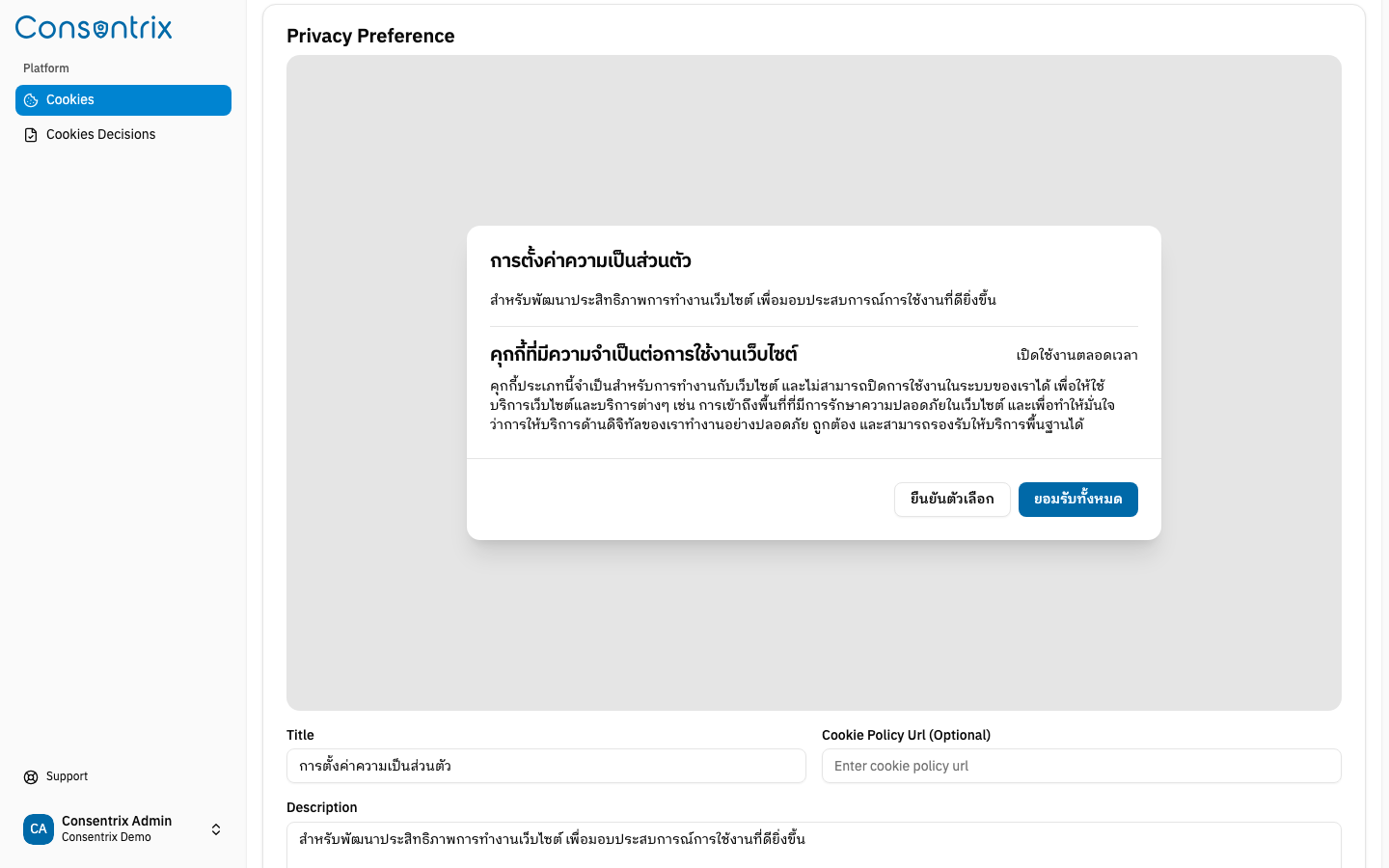
Panel preview
The live preview shows the full privacy preference panel as visitors will see it:
- A title heading
- A description paragraph
- Individual consent preference items with toggle switches
- Confirm Choices and Accept All action buttons
Configuration fields
| Field | Required | Default | Description |
|---|---|---|---|
| Title | Yes | การตั้งค่าความเป็นส่วนตัว | The heading of the privacy preference panel. |
| Description | Yes | สำหรับพัฒนาประสิทธิภาพการทำงานเว็บไซต์... | Body text explaining the purpose of the settings. |
| Cookie Policy URL | No | — | Optional link to your cookie policy page. |
Manage consent preferences
Below the panel-level settings, you can add individual consent preference items — each representing a cookie category.
Adding a consent preference
Click Add Consent to add a new preference row. Each row has the following fields:
| Field | Required | Description |
|---|---|---|
| Title | Yes | The display name of the cookie category (e.g. "Analytics Cookies"). |
| Type | Yes | Select from the dropdown — see Cookie types below. |
| Required | No | Toggle on to prevent users from disabling this category. Required items show as locked in the UI. |
| Description | Yes | Explains what this cookie category does and why it is used. |
Cookie types
The Type dropdown determines the category label shown to visitors:
| Type | Typical use |
|---|---|
| Necessary | Essential cookies required for the website to function (e.g. session, security). Usually marked as Required. |
| Analytics | Cookies that collect usage data to improve the website (e.g. page views, click patterns). |
| Marketing | Cookies used for advertising and targeting. |
When using the Analytics type with Consentrix's script, analytics tags are auto-blocked by default. This means analytics will not fire until the visitor explicitly accepts the analytics consent category.
Required preferences
When Required is enabled for a consent preference:
- The toggle switch in the live preview appears checked and disabled
- Visitors cannot turn off this cookie category
- This is typically used for Necessary cookies that are essential for website functionality
Action buttons
The privacy preference panel shows two buttons at the bottom:
| Button | Behavior |
|---|---|
Confirm Choices (ยืนยันตัวเลือก) | Saves the visitor's selected preferences. |
Accept All (ยอมรับทั้งหมด) | Enables all cookie categories at once. |
Best practices
- Always include at least one Necessary preference marked as Required.
- Provide clear, user-friendly descriptions for each cookie category.
- Keep the number of categories manageable — typically 3 to 5.
- Use specific, descriptive titles (e.g. "Analytics and Performance Cookies" rather than "Other Cookies").
Related Links
- Managing Cookies — Create and manage cookie configurations
- Cookie Banner — Configure the cookie banner
- Cookie Consent Overview — Understand the Cookie Consent feature